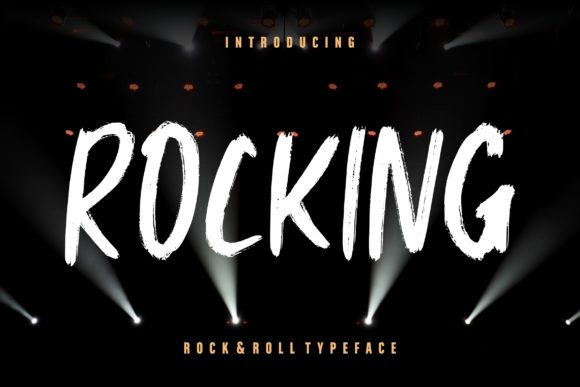
Rocking: A Bold Display Font with Authentic Charm
Rocking is more than just a font—it’s a statement. Designed with an authentic, handcrafted look, Rocking captures the essence of a brush pen, making it stand out in a world of digital uniformity. Its bold, expressive style is ideal for projects that demand attention and personality. Whether you're creating a flyer, designing a poster, or crafting content for social media, Rocking brings a unique flair that can elevate your message.
Why Rocking Stands Out
What sets Rocking apart is its authenticity. Unlike many modern fonts that rely on clean lines and minimal variation, Rocking mimics the natural imperfections of a brush pen. This gives it a raw, artistic feel that feels more human and less machine-made. It’s not just about aesthetics—it's about connection. When you use Rocking, you’re not just using a font; you're adding character to your design.
Its versatility makes it a favorite among designers, marketers, and creators who want to make an impact without sacrificing clarity. The font works best in larger sizes, where its bold strokes and organic curves really come to life. It’s especially effective for headlines, logos, and any text that needs to command attention.
Common Mistakes When Using Rocking
While Rocking is a powerful tool, there are common pitfalls that can reduce its effectiveness. Understanding these mistakes can help you avoid them and make the most of this unique font.
- Using Rocking for body text: One of the biggest mistakes is applying Rocking to large blocks of text. Its heavy, brush-like strokes can be difficult to read at smaller sizes, leading to eye strain and poor readability.
- Ignoring spacing and alignment: Rocking’s irregular shapes mean that careful attention must be paid to spacing and alignment. Poorly spaced text can look cluttered or unprofessional.
- Not considering the context: While Rocking is great for posters and flyers, it may not be suitable for all types of content. For example, using it in a professional report could send the wrong message about tone and seriousness.
- Overlooking licensing terms: Many fonts, including Rocking, come with specific usage rights. Failing to understand these can lead to legal issues or restrictions on how you can use the font.
- Not testing across devices: Rocking may look great on a high-resolution screen but could appear distorted or unclear on lower-quality displays. Always test your design on different devices before finalizing.
How These Mistakes Affect Your Work
Mistakes like using Rocking for body text can hurt both readability and user experience. If your audience can’t easily read your message, they’re less likely to engage with your content. Similarly, ignoring spacing and alignment can make your design look sloppy, reducing its overall impact.
Choosing the wrong context for Rocking can also affect brand perception. A font that’s meant to convey energy and creativity might clash with a more formal brand identity. On the other hand, using Rocking in the right context can enhance your message and create a stronger emotional connection with your audience.
Licensing oversights can lead to legal complications, which can be costly and time-consuming to resolve. Always review the font’s license agreement to ensure you’re using it in compliance with the terms. Testing across devices ensures that your design looks good everywhere, maintaining consistency and professionalism.
Practical Advice for Using Rocking Effectively
To get the most out of Rocking, follow these simple yet effective tips:
- Use it strategically: Save Rocking for headlines, titles, and key messages. Use it sparingly to maintain its impact and avoid overuse.
- Balance with other fonts: Pair Rocking with a clean, readable font for body text. This creates visual contrast and improves legibility.
- Pay attention to spacing: Adjust letter spacing and line height to ensure your text flows smoothly and remains easy to read.
- Check licensing terms: Before downloading or purchasing Rocking, review the font’s license agreement to understand how you can use it.
- Test your design: Preview your work on multiple devices and screen sizes to ensure it looks good everywhere.
What to Check Before Using Rocking
Before you dive into using Rocking, take a moment to consider the following:
- Is the font available for commercial use? Some fonts are only free for personal use. Make sure you have the right to use Rocking for your intended purpose.
- Does the font support the languages and characters you need? Not all fonts are created equal when it comes to language support. Check if Rocking includes the necessary characters for your project.
- Is the font compatible with your design software? Ensure that Rocking works well with the tools you use, such as Adobe Illustrator, Photoshop, or Canva.
- Will it fit your brand’s image? Consider whether Rocking aligns with your brand’s voice and visual identity. A mismatch can confuse your audience.
- Have you tested it in different contexts? Try using Rocking in various scenarios to see how it performs and adjust your approach accordingly.
Conclusion
Rocking is a versatile and expressive display font that can add a unique touch to your designs. By understanding its strengths and limitations, you can use it effectively to enhance your message and create visually compelling content. Avoid common mistakes by planning carefully, testing thoroughly, and choosing the right context for your design. With the right approach, Rocking can become a valuable asset in your creative toolkit.